Siemens Industrial Edge
Siemens Industrial Edge is an edge computing platform aimed at improving factory operations by bringing data processing and software management directly to the shop floor. It integrates hardware, software and connectivity solutions from both Siemens and its partners, enabling scalable and secure industrial workflows.
The AI Inference Server is one of the core applications in the Industrial Edge ecosystem. It hosts and runs AI models locally on the edge device, producing predictions from raw input data like images. By running inference on the edge, it avoids the latency and bandwidth costs of sending data to the cloud.
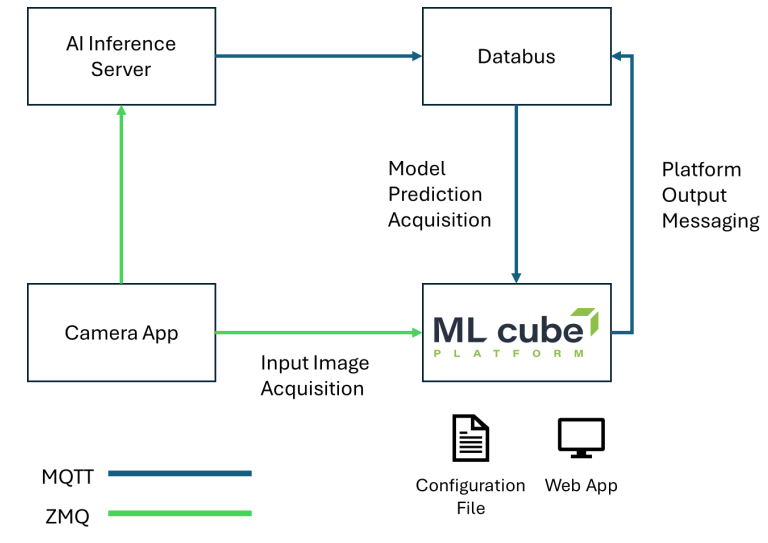
ML cube Platform works in tandem with Siemens AI Inference Server and other applications in the Industrial Edge ecosystem. It receives data from the same acquisition channels that AI Inference Server uses, it receives predictions from it and provides outputs on the desired destination.
Technical Integration Details
The base flow of ML cube Platform can be divided into three steps:
- Data acquisition
- Data processing
- Output messaging
As shown in Figure 1, the ML cube Platform is integrated with both MQTT and ZMQ, simplifying communication with other IE applications. ML cube Platform expects Input data (i.e. images) and Model Prediction data (i.e. bounding boxes). Input data can be provided both through MQTT and ZMQ, while Model Prediction data is expected from MQTT. The application works in conjunction with Siemens AI Inference Server, which hosts the AI Model and produces predictions. Flow Creator can be leveraged to create a flow that propagates those data to specific ZMQ / MQTT Topics for the ML cube Platform. After data are acquired from input channels, they are processed internally by ML cube Platform with retention limited to a few days avoiding storage saturation.
ML cube Platform outputs, such as monitoring alerts, are published to other MQTT Topics so that they can be received and processed by other applications.
Data Payloads
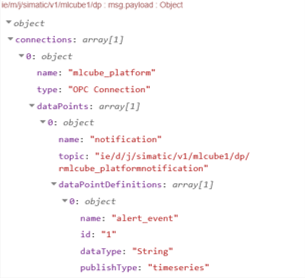
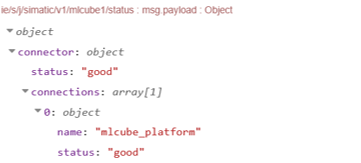
ML cube Platform follows payload formats guidelines of Siemens Industrial Edge. After the application is up it sends two MQTT message:
- Metadata for Notifications:
- Channel status:
When data drift occurs then a notification message is sent to the notification channel:
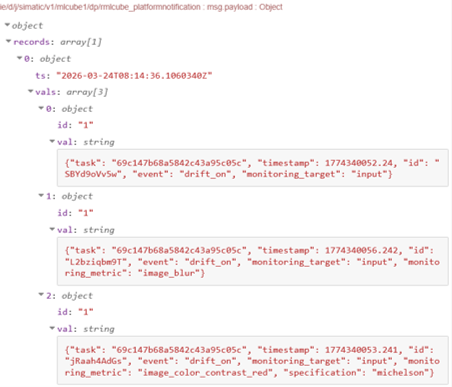
The content of val field is an object that contains the drift information.
Input
Input payloads of MQTT need to be properly configured before sending them to ML cube Platform. Flow Creator can be used to manipulate raw data before sending them to MQTT. Here the expected payloads:
| Message | Fields |
|---|---|
| MQTT Input Message | Fields: - sample_id: str - timestamp: float - arrival_timestamp: float | null - image_base64: str |
| ZMQ Metadata | Fields: - version: str - timestamp: float - detail: Detail[] - linepadding: int Detail fields: - id: str - seq: int - height: int - width: int - format_ns: str = 'Genicam' - format: str - image: bytes |
| MQTT Prediction Message | Fields: - sample_id: str - timestamp: float - arrival_timestamp: float - embedding_vector: float[][] | null - prediction: PredictionDict - prediction_prob: float[] | null PredictionDict (Binary Classification): - prediction: str PredictionDict (Object Detection): - prediction: BoundingBox[] - prediction_label: str[] > BoundingBox is a vector of four floats |
| MQTT Reset Message | Fields: - new_model_version: str |
Configuration
A JSON configuration file containing all the information about data connectors and monitored tasks is required to install and use the ML cube Platform. The ML cube Platform uses this configuration file to create all the internal entities and set up the application to acquire data and start monitoring.
You can see an example Here.
In the following paragraph the description of the fields in the config file.
Config file
| Field name | Data type | Description |
|---|---|---|
| notification_mqtt_info | NotificationMqttInfo | Connection string and topic name used for alerting. |
| task_info_list | list[TaskInfo] | List of tasks to monitor with ML cube Platform |
| processing_interval | int | Interval in seconds between two data uploads. |
| min_batch_size | int | Minimum number of data inside a batch to be uploaded. If data to be uploaded are lower than this value then the upload is skipped. |
| max_batch_size | int | Maximum number of data inside a batch to be uploaded. If data to be uploaded are higher than this value the subsampling is done before uploading. |
| messages_purge_interval | int | Interval in seconds before run data cleaning routine. This is used to avoid storing unmatched data that will never be uploaded. |
| messages_max_age_before_purge | int | Time in seconds of maximum allowed age. If a prediction or input data is older than this value it is dropped. This is used to avoid storing unmatched data that will never be uploaded. |
| image_dims | [int, int] | null | Image dimensions to use for image resizing before uploading. Note that resizing is done before rotation. If null then no resizing is done. |
| rotation_angle | int | null | Rotation angle in degrees – anticlockwise for rotation before uploading. Note that resizing is done before rotation. If null then no rotation is done. |
Notification MQTT Info
| Field name | Data type | Description |
|---|---|---|
| connection_string | string | Connection string used for alerting. Format tcp://[username:password@]host[:port] |
| data_point_name | string | Data point used to build the topic name |
Task Info
| Field name | Data type | Description |
|---|---|---|
| task_name | string | Name of the task to monitor |
| task_type | string | Type of the task to monitor, refer to the documentation for the possible values. |
| data_structure | string | Data structure of the task to monitor, refer to the documentation for the possible values. |
| timeseries_frequency | string | null | Frequency of the timeseries to monitor, refer to the documentation for formatting. |
| data_schema_info | DataSchemaInfo | Definition of the data that will be uploaded. |
| model_version | string | Version of the model to be monitored. |
| with_probabilistic_output | boolean | If the model provides additional probabilistic output. |
| positive_class | string | int | boolean | For binary classification tasks the value of the positive class. |
| input_message_info | MessageInfo | Information to read input samples from IED. |
| reset_message_info | MessageInfo | Information to read reset message from IED. |
| prediction_message_info | MessageInfo | Information to read prediction samples from IED. |
Data Schema Info
| Field name | Data type | Description |
|---|---|---|
| input_info | List[DataSchemaInputInfo] | List that specifies the model inputs. |
| embedding_dim | int | null | If the model provides input embedding it represents the dimension of it. |
| prediction_dtype | string | Data type of the prediction, refer to the documentation for possible values. |
| prediction_possible_values | List[string | int | bool] | null | If target is categorical it contains the possible values. |
Data Schema Input Info
| Field name | Data type | Description |
|---|---|---|
| name | string | Name of the input variable |
| subrole | string | null | For timeseries tasks it represents the role of the input, refer to the documentation for the possible values. |
| data_type | string | Data type of the variable, refer to the documentation for possible values. |
| possible_values | List[string | int | bool] | None | If the variable is categorical it is the list of possible values. |
| dims | List[int] | If the input is an array (also an image) it represents the dimensions. |
| tol | int | null | If an image is the difference with respect the dims for width and height to accept the input image. |
| image_mode | string | The type of the image: RGB, Grey, … |
| timeseries_mode | string | null | If the taks is timeseries it is how the variable is used in it (additive or multiplicative). |
Message Info
| Field name | Data type | Description |
|---|---|---|
| message_protocol | string | If ZQM or MQTT |
| connection_string | string | Connection string |
| topic | string | Topic to register |
License and Product Key
The ML cube Platform works with Siemens licence system, so the application is ready to use after the installation is completed.
Requirements
The ML cube Platform requires at least 6.5 GB of RAM to run on Edge Device, while the application weighs 3.2 GB. We are working on reducing these quantities, which will lead to a lighter application.