Multi-Turn Analysis
Conversational RAG systems do not answer a single isolated query. A user follows up, refers back to earlier answers, changes topic, or adds constraints on the structure of the response. Quality therefore depends on how well the model tracks the session, not only on how well a single turn matches its retrieved context.
Multi-Turn Analysis is the ML cube Platform module that evaluates those conversational sessions. It is available for RAG Tasks created with the Multi-turn attribute enabled.
Info
Single-turn RAG Evaluation scores the relationship between user input, retrieved context and response inside one sample. Multi-Turn Analysis groups samples into sessions and scores how each turn behaves in the conversation: core ideas, references to earlier turns, topic shifts, conciseness and positional bias.
Required data
A multi-turn RAG Task needs the usual RAG columns plus two metadata columns that reconstruct the conversation:
| Column | Role | Subrole | Description |
|---|---|---|---|
| User query | INPUT | RAG User Input | The user message for this turn. |
| Retrieved context | INPUT | RAG Retrieved Context | Context retrieved for this turn. |
| Model response | PREDICTION | — | The generated answer for this turn. |
| Session identifier | METADATA | RAG Session ID | Groups turns that belong to the same conversation. |
| Turn identifier | METADATA | RAG Turn ID | Order of the turn inside the session, starting at 0. |
A data schema template is available for this layout.
Note
session_id and turn_id are identifiers used to rebuild the conversation. They should not be used as segment dimensions.
SDK Example
Create a multi-turn RAG Task and attach the session / turn metadata columns.
task_id = client.create_task(
    project_id=project_id,
    name="Multi-turn RAG Assistant",
    tags=["rag", "multi-turn"],
    task_type=ml3_enums.TaskType.RAG,
    data_structure=ml3_enums.DataStructure.TEXT,
    optional_target=True,
    text_language=ml3_enums.TextLanguage.ENGLISH,
    llm_default_answer="I'm sorry",
    multi_turn=True,
)

data_schema = ml3_models.DataSchema(
    columns=[
        ml3_models.ColumnInfo(
            name="sample_id",
            role=ml3_enums.ColumnRole.ID,
            is_nullable=False,
            data_type=ml3_enums.DataType.STRING,
        ),
        ml3_models.ColumnInfo(
            name="timestamp",
            role=ml3_enums.ColumnRole.TIME_ID,
            is_nullable=False,
            data_type=ml3_enums.DataType.FLOAT,
        ),
        ml3_models.ColumnInfo(
            name="user_input",
            role=ml3_enums.ColumnRole.INPUT,
            is_nullable=False,
            data_type=ml3_enums.DataType.STRING,
            subrole=ml3_enums.ColumnSubRole.RAG_USER_INPUT,
        ),
        ml3_models.ColumnInfo(
            name="retrieved_context",
            role=ml3_enums.ColumnRole.INPUT,
            is_nullable=False,
            data_type=ml3_enums.DataType.STRING,
            subrole=ml3_enums.ColumnSubRole.RAG_RETRIEVED_CONTEXT,
        ),
        ml3_models.ColumnInfo(
            name="session_id",
            role=ml3_enums.ColumnRole.METADATA,
            is_nullable=False,
            data_type=ml3_enums.DataType.STRING,
            subrole=ml3_enums.ColumnSubRole.RAG_SESSION_ID,
        ),
        ml3_models.ColumnInfo(
            name="turn_id",
            role=ml3_enums.ColumnRole.METADATA,
            is_nullable=False,
            data_type=ml3_enums.DataType.INTEGER,
            subrole=ml3_enums.ColumnSubRole.RAG_TURN_ID,
        ),
    ]
)
client.add_data_schema(task_id=task_id, data_schema=data_schema)
Configure the multi-turn monitoring metrics on the Task so that sessions are evaluated as data is uploaded. Each of those metrics uses an explicit threshold.
Open a multi-turn RAG Task and select Multi-Turn Analysis. The page has two tabs:
| Tab | Description |
|---|---|
| Explore Sessions | Browse evaluated sessions individually as cards and drill down into a single session. |
| Reports | Bundle a chosen set of sessions into a named report with an aggregated summary. |
An All sessions button, next to the tabs, opens a drawer listing every session of the Task, evaluated or not, with a search by session ID. Use it to look up the session IDs needed for a report.
Explore Sessions
The Explore Sessions tab lists evaluated sessions as cards.
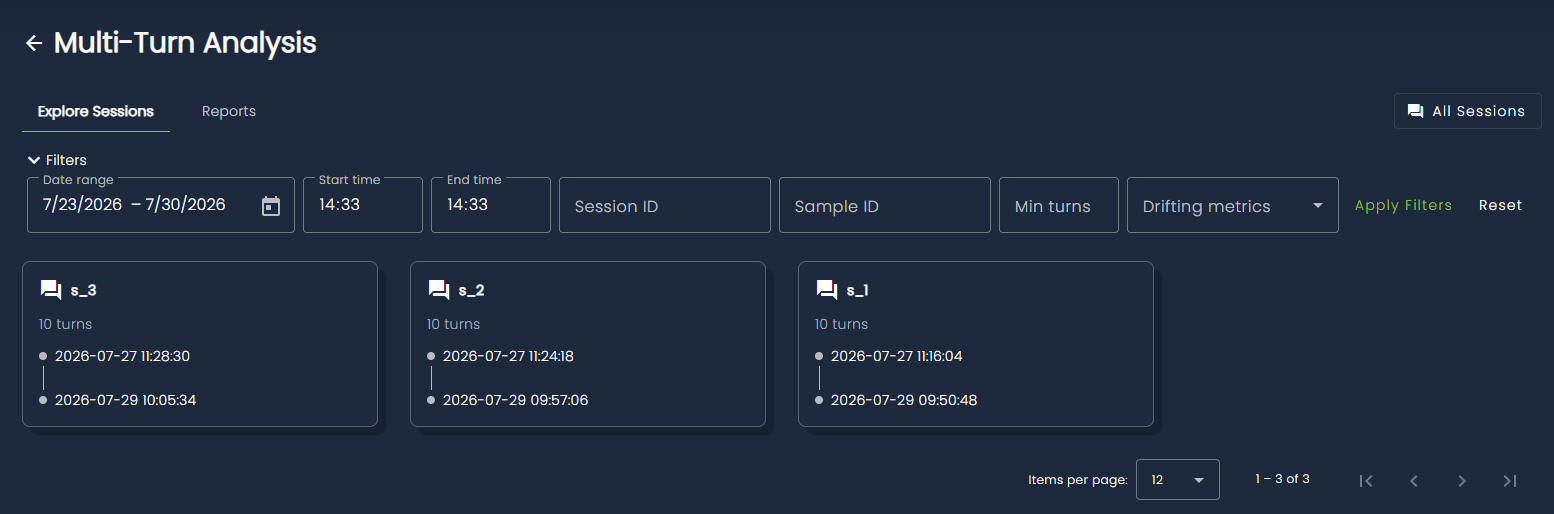
Each card shows:
| Field | Description |
|---|---|
| Session ID | Identifier sent in the session_id metadata column. |
| Number of turns | The number of turns evaluated within the session. |
| Timespan | Timestamps of the first and latest evaluated turns. |
| Drifting metrics | Multi-turn monitoring metrics that drifted on this session, when available. |
Filters
Use the filter bar to narrow the list:
| Filter | Description |
|---|---|
| Date range / start time / end time | Keep sessions whose starting turn falls in the interval. The default range is the last seven days up to the most recent data batch. |
| Session ID | Retrieves the session with the specified session ID. |
| Sample ID | Retrieves the session that contains the turn with this sample ID. |
| Min turns | Minimum conversation length. |
| Drifting metrics | Keep sessions that drifted on one or more multi-turn metrics. |
Session analysis
Click a session card to open its analysis. Session-level scores are averages over the evaluated turns of that conversation.
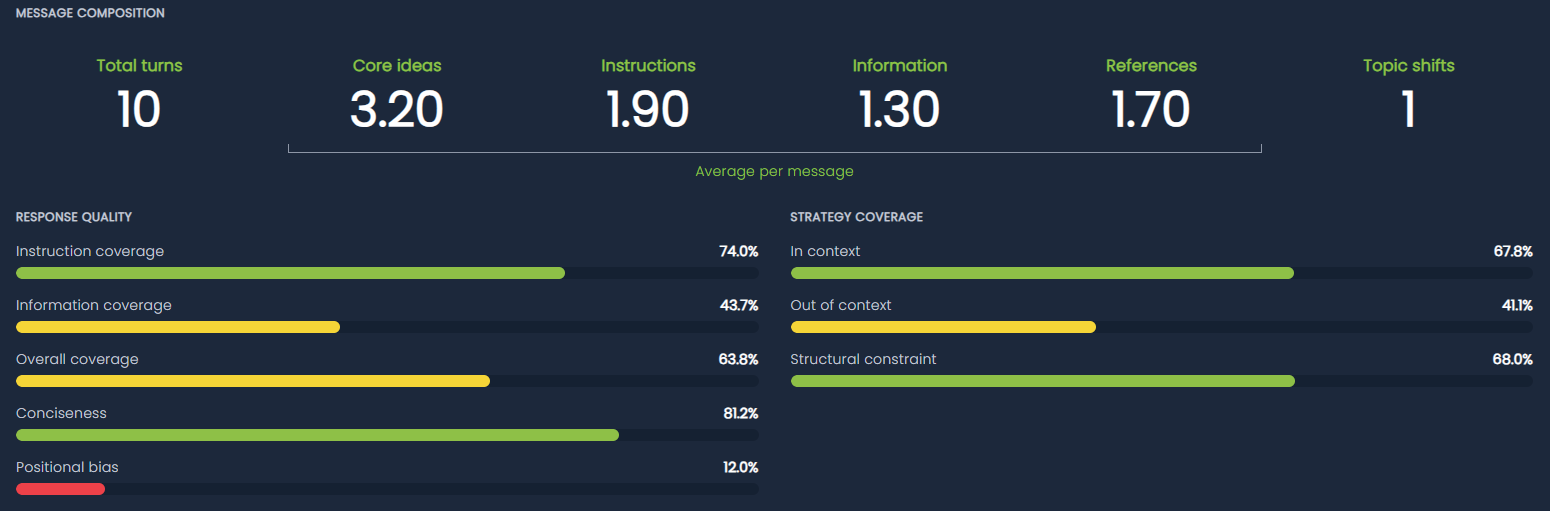
Message composition
| Statistic | Description |
|---|---|
| Total turns | Number of turns in the session. |
| Core ideas | Average number of core ideas extracted per user message. |
| Instructions | Average number of core ideas classified as Instruction. |
| Information | Average number of core ideas classified as Information. |
| References | Average number of references to earlier turns per message. |
| Topic shifts | Number of turns where the user topic changed relative to the previous turn. |
Response quality
Quality bars are percentages from 0 to 100. Higher is better: green is high, yellow is medium, red is low.
| Metric | Description | Monitoring metric |
|---|---|---|
| Instruction coverage | How well the response addresses instructional core ideas, weighted by importance. | TEXT_MULTI_TURN_INSTRUCTION |
| Information coverage | How well the response addresses informational core ideas, weighted by importance. | TEXT_MULTI_TURN_INFORMATION |
| Overall coverage | Importance-weighted coverage across all core ideas. | TEXT_MULTI_TURN_OVERALL |
| Conciseness | How close the response length is to a concise summary of itself. A long, redundant answer scores lower than a compact one. | TEXT_MULTI_TURN_CONCISENESS |
| Positional bias | How little the position of a core idea in the user message affects how well it is answered. Higher means less bias. | TEXT_MULTI_TURN_POSITIONAL_BIAS |
Strategy coverage
Each core idea can be tagged with one or more response strategies. Session bars average those tag scores:
| Metric | Description | Monitoring metric |
|---|---|---|
| In context | The core idea can be answered from the retrieved context. | TEXT_MULTI_TURN_IN_CONTEXT |
| Out of context | The core idea is not grounded in the retrieved context. | TEXT_MULTI_TURN_OUT_OF_CONTEXT |
| Structural constraint | The core idea imposes a format or structure (for example "reply with one capital word"). | TEXT_MULTI_TURN_STRUCTURAL_CONSTRAINT |
Coverage across turns
The chart plots per-turn coverage over the conversation. Each series is a category, a strategy tag, or the overall score. Horizontal dashed lines mark the mean of each series. Gaps appear when a turn has no value for that series.
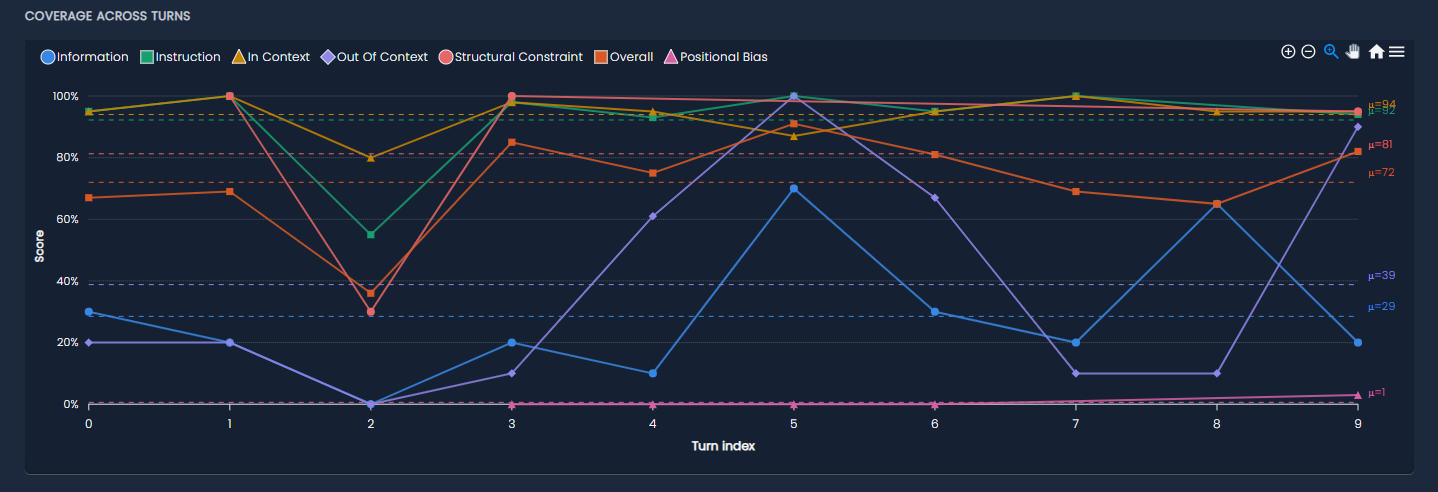
Click a point in the chart legend to hide a series. Use the turn slider or the Turn field to inspect a specific turn.

Turn details
The selected turn shows the reconstructed conversation and every evaluation artifact computed for that sample.
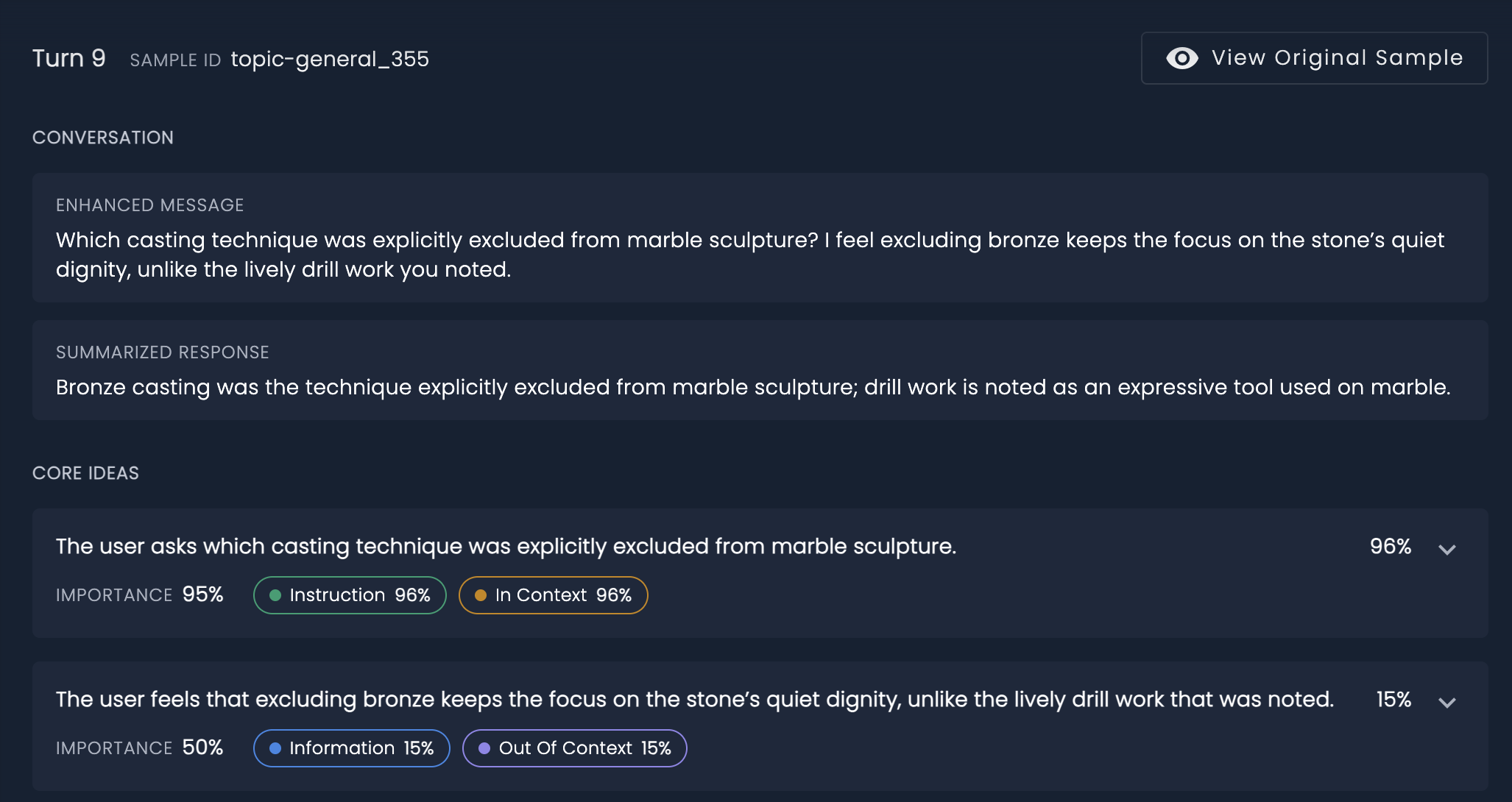
View original sample opens the Data Explorer sample viewer for the underlying sample_id.
Conversation
Before scoring, the pipeline rewrites the user message using previous turns (enhanced message) and compresses the model output (summarized response). Follow-up questions such as "which of those should we prioritize?" become self-contained, so later steps can evaluate the turn without replaying the full chat.
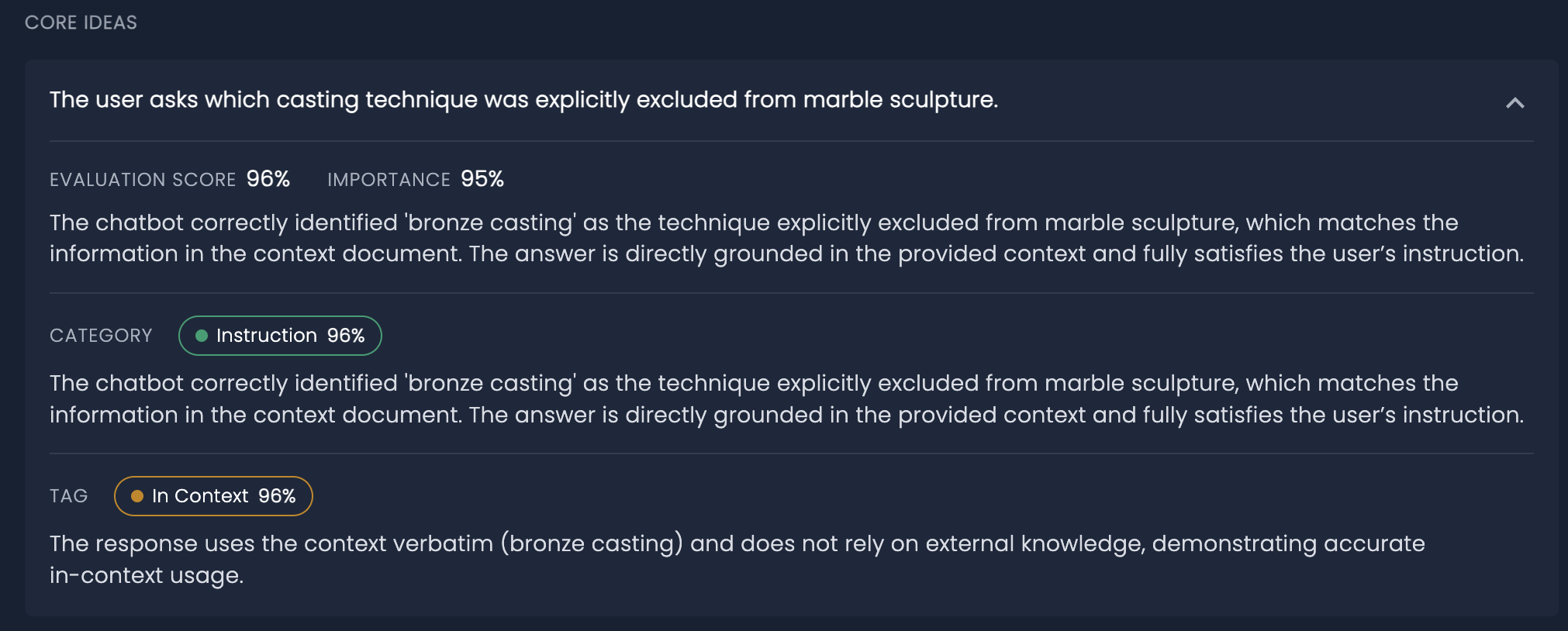
Core ideas
A core idea is an atomic request or statement extracted from the enhanced message. Each idea has:
| Field | Description |
|---|---|
| Text | The idea in natural language. |
| Importance | 0–100, how central the idea is to the user message. |
| Evaluation score | 0–100, how well the response addresses that idea. |
| Category | Instruction (something to do) or Information (something stated or asked). |
| Tags | Strategy tags: In context, Out of context, Structural constraint. |
| Rationale | Short explanation of the score, category and tags. |
Expand a card to read the rationales for the idea, its category and each tag.
References
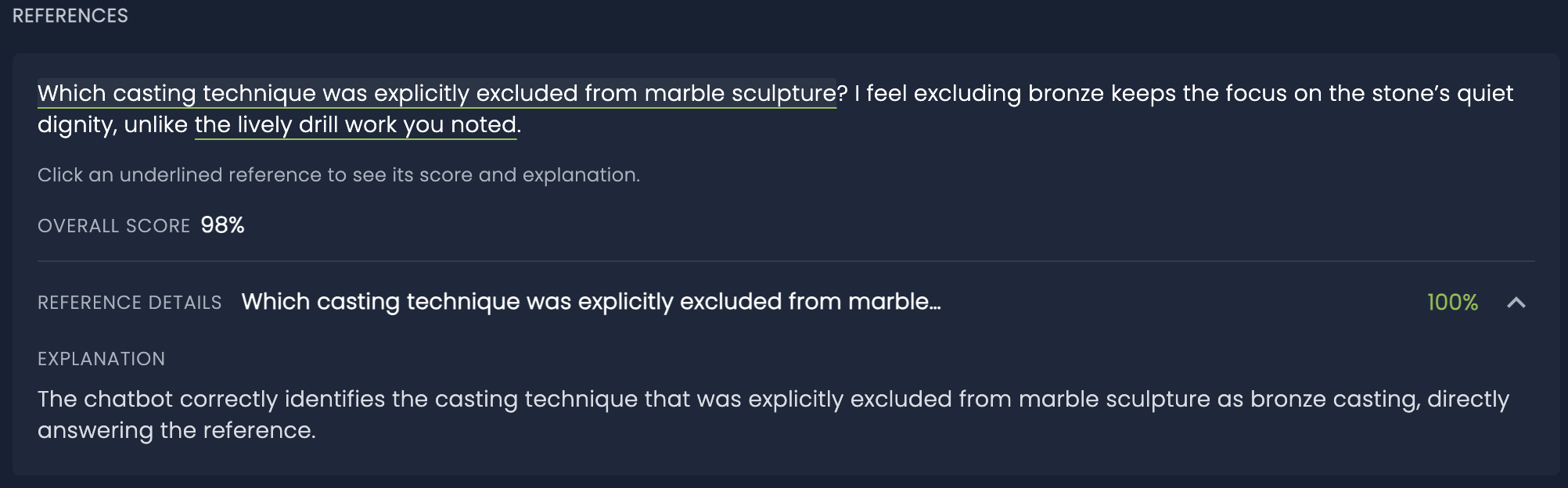
References are phrases that point to earlier turns ("that quarry", "the drill work you noted"). The message is shown with those phrases underlined. Click an underlined span to open its resolution score and explanation.
The overall score is how well the response resolves the references in the current message (TEXT_MULTI_TURN_REFERENCE_RESOLUTION).
Topic shift
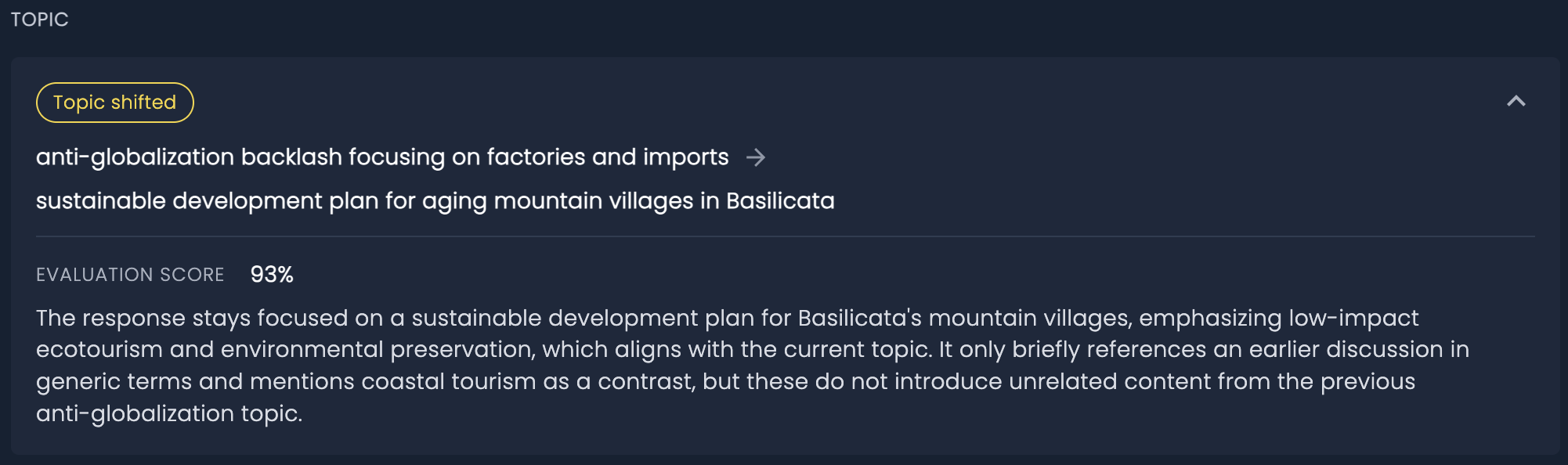
When the user topic changes relative to the previous turn, a Topic shifted badge appears, with the previous topic, the current topic, a score and a rationale (TEXT_MULTI_TURN_TOPIC_SHIFT). The score measures whether the response followed the new topic.
Conciseness, overall evaluation and correlations
The bottom of the turn panel summarises length, aggregate scores and correlations across the core ideas of that message.
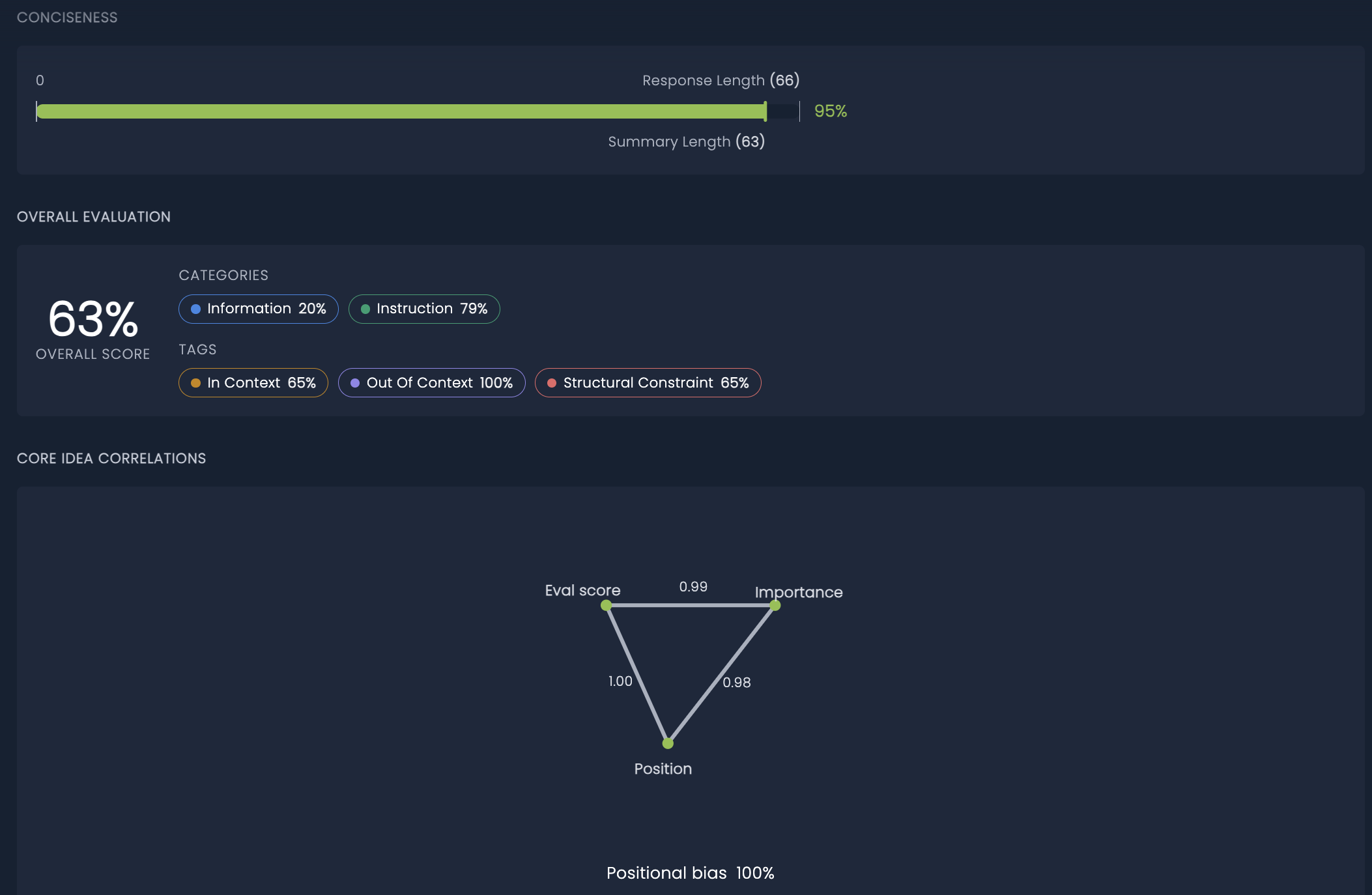
Conciseness compares response length with summary length. The score is the summary-to-response length ratio, expressed as a percentage. A response that is already as short as its summary scores close to 100%. A verbose response whose summary is much shorter scores low.
Overall evaluation repeats the turn-level overall score together with the aggregated category and tag chips (the same series shown on the coverage chart).
Core idea correlations relate three quantities computed on the ideas of the turn:
| Correlation | Meaning |
|---|---|
| Eval score vs importance | Whether important ideas are also the ones answered well. |
| Eval score vs position | Whether later (or earlier) ideas in the message are answered better. |
| Importance vs position | Whether important ideas appear later (or earlier) in the message. |
| Positional bias | How little the position of ideas in the message affects how well they are answered. Higher means less bias. |
When the three pairwise correlations form a valid triangle, they are drawn as a graph. Otherwise the values are shown as a table.
Reports
The Reports tab bundles a chosen set of sessions into a named report with an aggregated summary. A report guarantees that every session included in it is evaluated for the Task's applicable multi-turn monitoring metrics.
Generating a report
Click New report, give it a unique name, and add one or more session IDs (use the All sessions drawer to look them up). Creating the report starts a job that evaluates any session that is not yet evaluated.
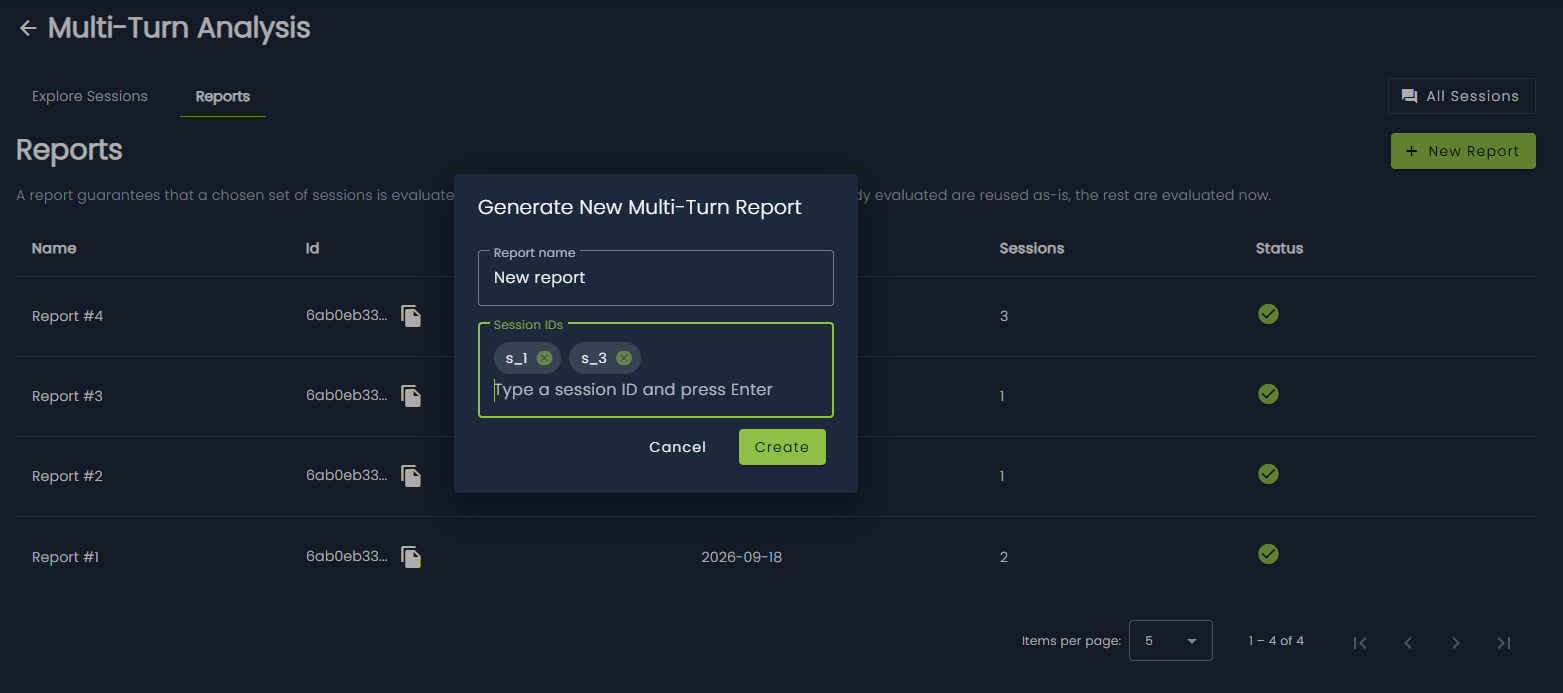
The Reports tab lists every report created for the Task:
| Column | Description |
|---|---|
| Name | The report name. |
| Id | Report identifier, with a copy-to-clipboard action. |
| Created | Creation date of the report. |
| Sessions | Number of sessions included in the report. |
| Status | Job status: pending, completed or error. Pending reports can be refreshed manually. |
SDK Example
Compute a multi-turn report for a set of sessions and wait for it to complete.
# Computing the multi-turn report
multi_turn_report_job_id = client.compute_multi_turn_report(
    task_id=task_id,
    report_name="multi_turn_report_name",
    session_ids=["session_1", "session_2", "session_3"],
)

# Waiting for the job to complete
client.wait_job_completion(job_id=multi_turn_report_job_id)

# Getting the report
reports = client.get_multi_turn_reports(task_id=task_id)
report = reports[-1]
Report summary
Click a completed report to open its summary.
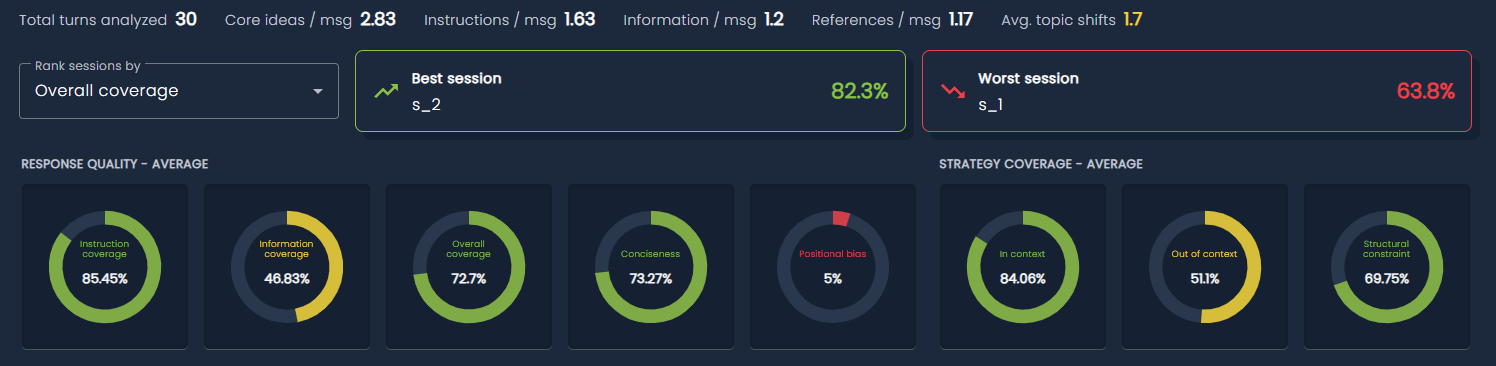
A compact stats row averages, across the evaluated sessions of the report: total turns analyzed, core ideas, instructions, information and references per message, average topic shifts and positional bias. When any session in the report drifted on a monitoring metric, a Drifting metrics row counts how many sessions drifted per metric.
The Rank sessions by dropdown selects which metric drives the Best session and Worst session highlight cards. Click a card to open that session's analysis.
Two gauge groups show the report-wide average of the response quality and strategy coverage metrics, one gauge per metric.
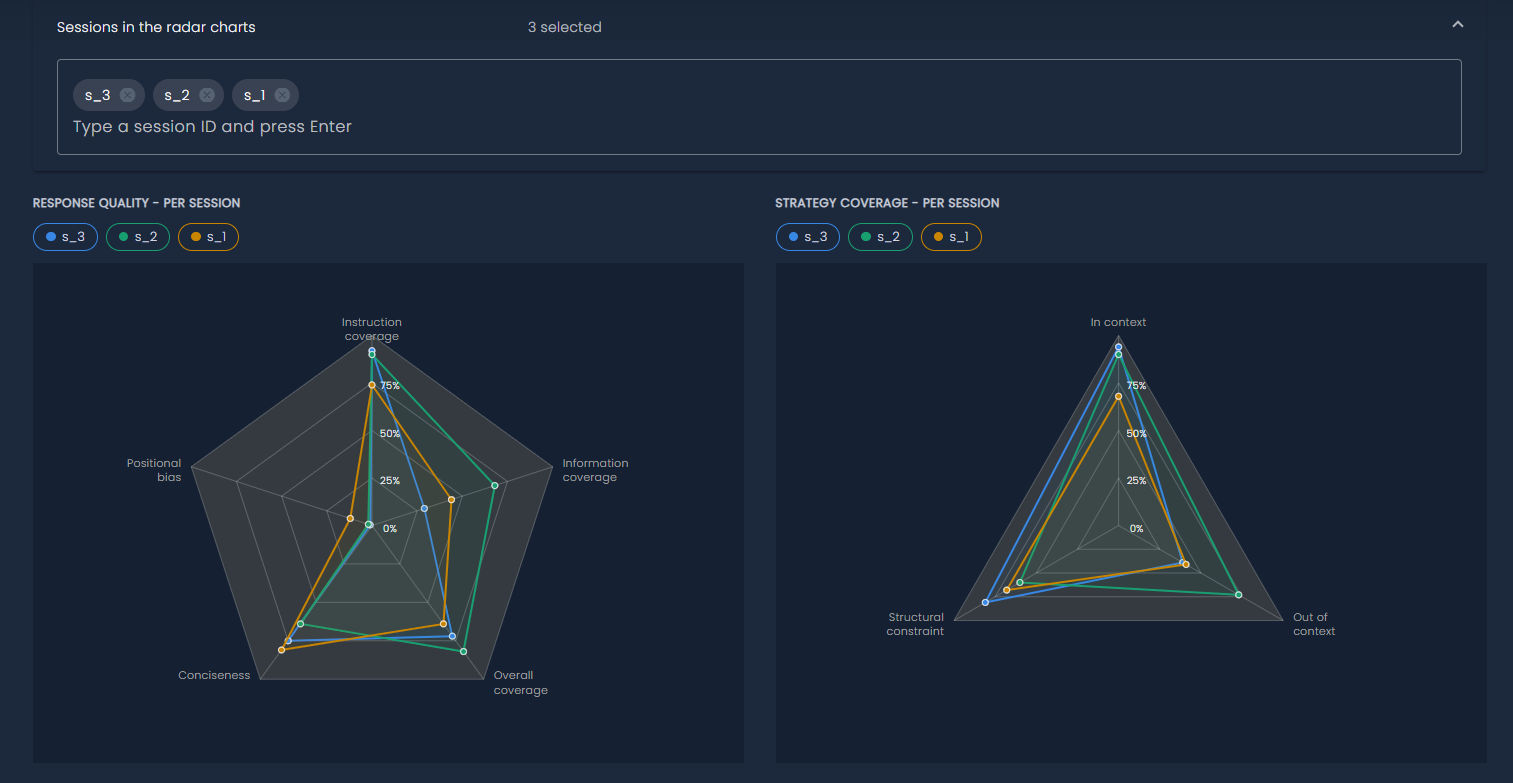
Below the gauges, a session selector chooses which sessions are plotted as radar charts, one polygon per session, on the same response quality and strategy coverage metrics. Click a session in the legend to show or hide its polygon.
Sessions details
The bottom of the report page lists the report's sessions as cards, using the same layout as Explore Sessions. Click a card to open its session analysis and turn details inline.
Monitoring metrics
The following monitoring metrics are produced by Multi-Turn Analysis and can be used for drift detection on the prediction of a multi-turn RAG Task:
| Monitoring metric | Turn-level quantity |
|---|---|
| TEXT MULTI TURN INFORMATION | Information coverage |
| TEXT MULTI TURN INSTRUCTION | Instruction coverage |
| TEXT MULTI TURN OVERALL | Overall coverage |
| TEXT MULTI TURN IN CONTEXT | In-context strategy coverage |
| TEXT MULTI TURN OUT OF CONTEXT | Out-of-context strategy coverage |
| TEXT MULTI TURN STRUCTURAL CONSTRAINT | Structural-constraint coverage |
| TEXT MULTI TURN POSITIONAL BIAS | Positional bias |
| TEXT MULTI TURN CONCISENESS | Conciseness |
| TEXT MULTI TURN REFERENCE RESOLUTION | Reference-resolution score |
| TEXT MULTI TURN TOPIC SHIFT | Topic-shift score (on turns where the topic changed) |
Completed reports can also be exported as ZIP archives of JSON files, see Exports.